Posts tagged: T-SQL Tuesday

T-SQL Tuesday #17–APPLY in Compatibility 80

Welcome to T-SQL Tuesday for April 12, 2011. This month is generously hosted by Matt Velic (Blog | Twitter), who poses the topic of APPLY, one of the many excellent additions to the T-SQL language in SQL Server 2005.

If you read other T-SQL Tuesday posts from today, you’ll get some excellent tips on how to use APPLY, and a list of the excellent things you can do with it. I’m going to go in a slightly different direction, and examine what your options are when using APPLY with database compatibility level 80.

Books Online states that the database must be at least compatibility level 90 to use APPLY.

It turns out that you can create a query that uses APPLY, and have it run in compatibility level 80. Consider the following setup:

CREATE DATABASE Compat80
GO
ALTER DATABASE Compat80 SET COMPATIBILITY_LEVEL=80
GO

USE Compat80
GO
SET NOCOUNT ON
CREATE TABLE A (i int, name varchar(20))
CREATE TABLE B (i int, amount decimal(15,3))
INSERT INTO A (i, name) VALUES (1, 'Jack')
INSERT INTO A (i, name) VALUES (2, 'Bob')
INSERT INTO A (i, name) VALUES (3, 'Sally')
INSERT INTO B (i, amount) VALUES (1, 25.0)
INSERT INTO B (i, amount) VALUES (1, 50.5)
INSERT INTO B (i, amount) VALUES (2, 16.0)
INSERT INTO B (i, amount) VALUES (3, 110.0)
GO 

Can we use an APPLY in Compatibility 80?

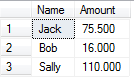
We’ve created a database in compatibility level 80, and created two tables, A and B. Let’s try a query with CROSS APPLY:

SELECT A.Name, dv.Amount FROM A
CROSS APPLY (SELECT i, SUM(Amount) Amount
             FROM B WHERE B.i = A.i GROUP BY i) dv 

image

There’s not much to say here, except that I proved Books Online wrong – I can do a CROSS APPLY in Compatibility 80. I don’t know the exact reason why I can do this, but it’s likely to be the simplistic nature of the query (which makes it less interesting). I’ll do a quick little victory dance, and we’ll move on.

A more useful use of APPLY

Where APPLY really shines is when functions are used. Let’s go ahead and create a simple function to test with:

CREATE FUNCTION dbo.fn_getB(@i AS int)
RETURNS @result TABLE
(
      i   int NOT NULL
    , amount decimal(15,3)
)
AS BEGIN
        INSERT INTO @result
        SELECT i, amount FROM B WHERE i = @i
        RETURN
END
GO

The logic for this function is slightly different than the previous, but it only serves to make it more interesting. Let’s go ahead and use this function in an APPLY, remembering that we’re still in Compatibility 80:

SELECT * FROM A
CROSS APPLY dbo.fn_getB(A.i) dv 

Msg 102, Level 15, State 1, Line 2

Incorrect syntax near ‘.’.

That’s disappointing, and rather cryptic. Let’s try again after switching to Compatibility 90:

ALTER DATABASE Compat80 SET COMPATIBILITY_LEVEL=90
GO
SELECT * FROM A
CROSS APPLY dbo.fn_getB(A.i) dv
GO 

image

Success!

Getting around this restriction

We’ve seen that APPLY using functions is a handy tool, but can we still use it in databases that are in Compatibility 80? The following is a workaround, but it’s a bit of a hack. I just like thinking outside the box.

The limitation here is that we cannot let a Compatibility 80 database execute the query. We can, however, run the query from within a different database, such as Master (ignoring permission issues) by using sp_executesql.

EXEC sp_executesql N'USE Master;
        SELECT * FROM Compat80.dbo.A
        CROSS APPLY Compat80.dbo.fn_getB(A.i) dv '
GO

The main reason I’d want to use APPLY is to use the DMFs with the DMVs provided by SQL Server 2005, such as sys.dm_exec_*. However, these DMVs typically supply a database_id column, meaning you can run the query from within Master anyway. With that in mind, I can’t think of any real benefit of this technique – it’s almost always a better option to simply upgrade your databases to compatibility 90 or above – we are in 2011, after all.

Thanks again for this month’s edition of T-SQL Tuesday, Matt!

Can We Reproduce Columnstore Aggregations in SQL 2008? (T-SQL Tuesday #016)

The subject of T-SQL Tuesday #016, kindly hosted by Jes Borland (blog | twitter), is Aggregation. Although it’s a fine topic, I could not figure out what I could write about aggregation that would capture my interest, and more importantly, dear reader, yours.

I thought about the topic ceaselessly while doing dishes, feeding children, and cleaning up the house. I considered aggregate functions, and optional grouping parameters. I twisted the topic inside and out, trying to figure out an interesting angle. I considered telling a story about the Tuples vs the Aggregates on their way to Query Station (and spent an embarrassingly long time on that train of thought). Finally, I went out for a run, thought of a topic pretty quickly and started turning the idea over in my mind for the next 7 km.

Columnstore Indexes

A columnstore index is a new feature of Denali, whereby an index is stored vertically – one column per page.  Here is the whitepaper download – highly recommended, and only 5 pages of text. Imagine a row of a typical covering index (in this case, AdventureWork’s Person.Person table, and I’ve covered every column):

image

Every row stored in this particular index is stored on the same page. As each row is quite wide, only 5 rows will fit per 8 KB page.

A columnstore index, however, stores each column on a separate set of pages. I am unsure of the ordering of the rows* but each page is compressed. As the column is likely to contain similar data, this means that each page can have excellent compression ratios – a factor of 4-15 is quoted in the whitepaper – and thousands of rows can fit on a single page.

* Due to a lack of internals documentation so far. Are they ordered by the column, or by the clustering key? I can see arguments for either way, but haven’t yet dived deep enough to decide one or the other.

This allows for fantastic performance gains when performing aggregates, as fewer pages need to be read to service the query, and only the columns actually required by the query need to be accessed.

Howerver, due to the fact that columnstore indexes are read only, they really only have applications in data warehouses.

Can we reproduce columnstore indexes in SQL Server 2008?

The question of whether it is possible to reproduce columnstore indexes in SQL Server 2008 popped into my mind, and the short answer is “No, not a chance”. Sorry.

Let’s look at the properties of a columnstore index.

Read Only – SQL Server 2008 can certainly build index structures on read-only data. And, as it’s read only, separate aggregation steps can be created in 2008 to summarise data ahead of time. However, one of columnstore’s selling points is to remove the need to aggregate. Columnstore gives you a massive performance benefit with little effort.

Highly Compressed – SQL Server 2008 can compress indexes. However, to get highly compressible indexes, similar to columnstore’s you’ll only want a single column, which makes the index less useful, and forces you to join frequently.

Only select required columns – A query accessing a columnstore index will only access those columns that are needed by the query. To get the same sort of functionality in 2008, you would need to either create a covering index for each query you want (nothing like columnstore!), or join multiple indexes together (resulting in a large amount of logical reads).

Different table structure – Denali is able to use a completely different page structure, particularly as this data is read-only. This is not possible in SQL Server 2008, and still be usable with T-SQL.

No code changes – Denali’s implementation allows us to create a single columnstore index on all columns in the table, and we don’t need to modify any queries to use these columnstore indexes. It’s completely seamless.

I tried to create an example where we could create similar compressed indexes in 2008, but I was never able to merge multiple indexes together to query the data efficiently. Denali has specific optimisations available for columnstore indexes, and these cannot be reproduced. About the best we can do is to create a read-only compressed covering index, which is nowhere  near impressive these days.

After a few hours considering this, my conclusion is that you are better off optimising your data warehouse for those queries that you know are going to come, and ad-hoc queries will need to continue to run slowly, at least until you’ve upgraded to Denali. Frequently run queries will benefit from extra customisation (pre-aggregation, specialised indexes with compression), but there no chance of a similar payoff inside the database engine.

Not too long to wait now, and you’ll be able to take advantage of columnstore indexes!

T-SQL Tuesday #014 – Resolutions

Another T-SQL Tuesday has rolled around, and for once I was prepared for it.  This month’s topic, hosted by Jen McCown (blog|twitter) is on the topic of Resolutions.  I spent a week rolling around ideas in my head for this topic, hit upon some excellent angles, and then had fate completely change the direction of my post.


I’m not a big believer in "New Year’s Resolutions", mostly because they’re so clichéd and popular opinion is that you’re doomed to fail if you have one.  Instead, I appreciate the holiday period as a time to reflect and set more general life directions, as opposed to the focussed task of "exercise more". 

In terms of SQL Server related goals that I want to accomplish this year, a quick brainstorm came up with the following:

  • I really should blog more often, say once per week.   Something 95% of SQL bloggers say every few months.
  • I really should post a bit more on my favourite SQL-based forums.  Two quality posts a day sounds feasible.  This one mostly comes down to time.
  • Wow, that MCM certification looks awfully interesting, challenging, yet achievable.  Let’s do that!
  • 2011 will be the year where I get my head around recursive CTEs!
  • Can I please, please, please use the MERGE command in production code?
  • Denali, I’m playing with you.  Get ready to be swept off your feet!
  • I’m going to slow my handwriting down, and write legibly and neatly for the first time in 15 years. (Not a technical wish, but still important!)

That third point, the MCM should be enough to keep me busy for the first half of the year at least.  I’ll need to do the MCITP 2008: Upgrade from 2005 DBA exam (70-453), and then the MCTS 2008: Developer exam (70-433) (I’ve already done the 70-451, back when it was in beta).

I have already planned for these in a more serious way.  I changed different things in my life in November, December and January, so there’s nothing particularly significant about January 1.  Do it now – don’t wait until some arbitrary date!

However, it is important to consider the non-technical side of your life, which is something that hit home to me again last night as I received news of my wife’s family in flood-ravaged south-east Queensland.  Don’t be so fixated on SQL Server that you dilute or lose connections with your loved ones.  No matter how warm SQL Server may be (especially when you’re standing next to the server during business hours!), it’s a very poor substitute to family and friends.

WordPress Themes